


How to Make a Budget in Excel or Google Sheets (Free Paycheck Budget Template)
Melanie dj • 24 October 2026
I was a CPA before I came home to raise our kids, so yes, I'm the girl who has a spreadsheet for everything. But our budget spreadsheet is the one that changed our life.
When we got married, we paid off over $20,000 of student loans in 12 months on one income, and a simple spreadsheet is how we kept every dollar on track. Today we're a family of six, still on one income, homeschooling four kids and building our house ourselves. The budget looks different now, but the system hasn't changed.
You don't need to be good with numbers or technology to do this. I'll walk you through how to make a budget in Excel or Google Sheets step by step, and you can grab the exact template I use for free.
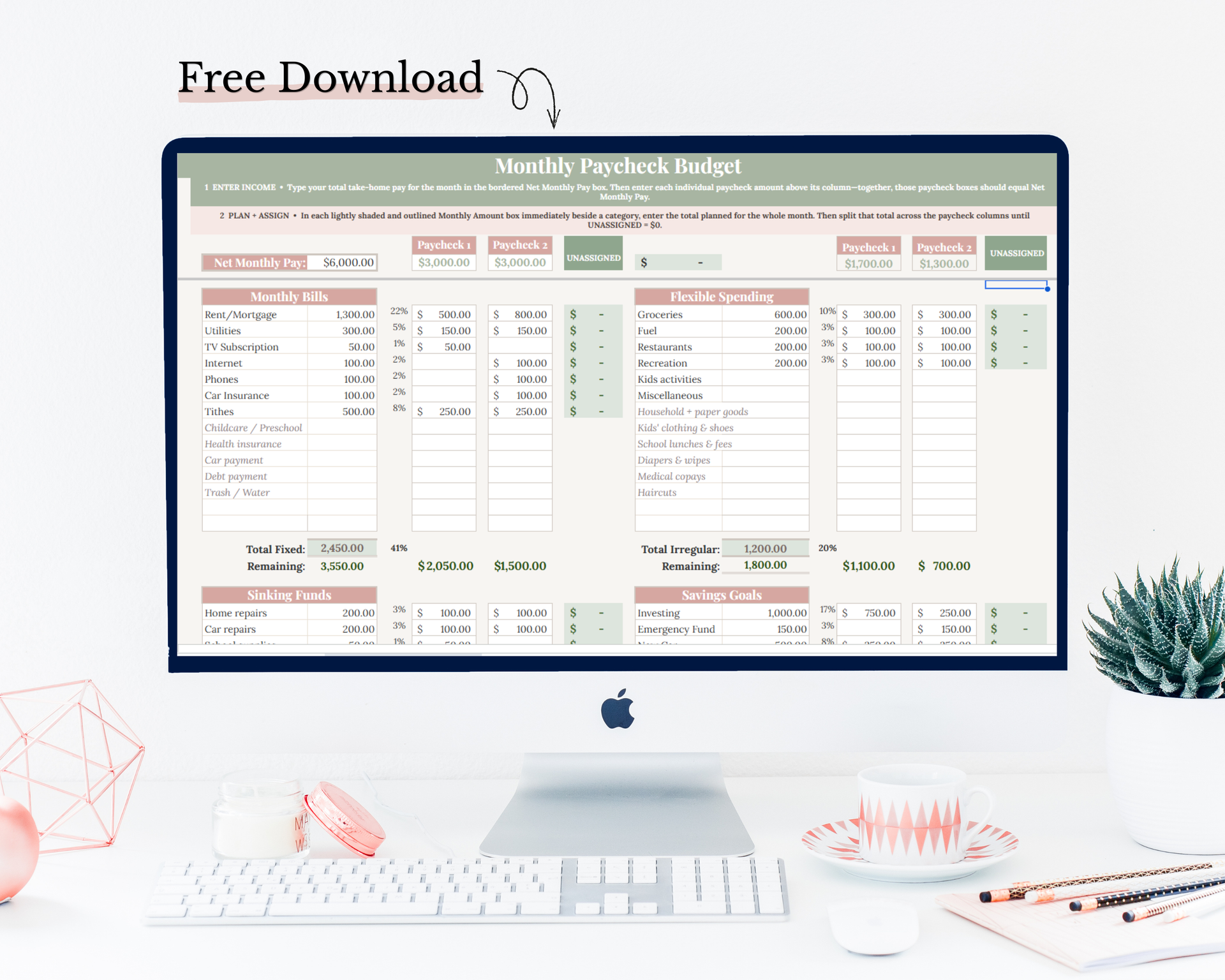
Get the Free Budget Template First
It's built in Google Sheets, and you can download it as an Excel file in two clicks (File → Download → Microsoft Excel). Open it next to this post and fill it in as you go.
Why a Spreadsheet Budget Works
If you're guessing how much is left until payday, or using a credit card to cover the gap every month, it's time. A spreadsheet is free, works on your phone, and you can set it up exactly the way your family actually lives.
I've used apps too. I always come back to the spreadsheet, because I can see the whole month, every paycheck, and every sinking fund on one screen.
A budget allows you to align your priorities with your finances. Many times, the level of our frustration with our money is the difference between what we want our money to do and what it's actually doing. Budgeting will help you bridge the gap between the two!
Spreadsheet vs budgeting app
I used the free version of the EveryDollar app for years, and I still kept a spreadsheet next to it to double-check everything. Eventually I realized the spreadsheet was doing all the real work.
How to Make a Budget in Excel (Step by Step)
1. Write Down Your Take-home Pay
At the top of the sheet, enter what actually lands in your bank account this month, not your salary. If your income changes month to month, use your lowest normal month. It's always easier to budget low and have extra than the other way around.
2. List all your fixed monthly expenses.
Fixed expenses are expenses that don't change month to month, typically your bills. You know exactly how much they will be and when they are due. Examples include:
- Mortgage/rent
- Insurance
- Internet
- Phone
- Cable/TV subscription
- Car payments
- Student loan payments
Total your fixed expenses and subtract from your expected income. This is what you have left to budget with for your remaining expenses.
3. List all your variable monthly expenses.
Variable expenses are expenses that do change month to month, based on usage or another metric. Think groceries, gas, household, kids' clothes, eating out. These expenses are typically manipulated easier than fixed expenses.
List all your variable expenses on your budget worksheet and determine a max spending amount for each. You might need to review bank statements to help you get an idea of what you've been spending on each category. Don't guess! You want an accurate picture of your expenses... your guess is almost always too low.
Here are some of our variable monthly expenses (updated Oct 2026):
- Groceries: $900-$1k (see how we afford semi-organic as a family of six)
- Gas/fuel: $250-$300 (I'm a stay at home mom and my husband works from home)
- Restaurants: $200 (down from $400 pre-DIY house build)
- Household: $700 (includes non-grocery items, decor, kitchen supplies, etc)
- Personal
- Beauty
- Toiletries
- Household
- Babysitters
- Daycare
- Clothing
Most variable expenses are also considered discretionary, meaning they are wants rather than needs and therefore very flexible. You might want to note which expenses in your budget are discretionary so you can come back to them later and adjust if necessary.
4. Budget for non-monthly expenses using sinking funds.
You know those annoying expenses that you completely forgot about that come up at the worst possible time? Like your car needs new tires, then your annual insurance premium you forgot about is due, and your kids have sports fees due next week? When you're unprepared, everything seems to be happening to you. However, when you're prepared and unexpected expenses come up, it's just an inconvenience.
There is a way to plan for both expected and unexpected irregular (non-monthly) expenses. A sinking fund savings account is a strategic way to set aside money for future expenses by converting the expense to a monthly amount.
Here's how to set one up (follow along on Pinterest)
Related posts:
5. Put finance goals in the budget.
Saving and investing goals need to be a line item in your monthly budget. If you don't put them in the budget, they won't happen.
Banking on just using whatever you have left at the end of the month for saving and investing is a terrible strategy.
Make it part of the plan. Automate it. This is an essential self-discipline to have with your finances if you want to build wealth.
6. Tweak and budget down to zero.
Give every single dollar a purpose on paper before the month begins. Don't leave any 'slush' funds. Purpose, purpose, purpose. Every single dollar has a purpose.
7. Track it every week.
A budget you only look at on the 30th is just a guess. Update the spreadsheet once or twice a week (I update our budget every Friday on payday) so you always know what's left in each category.
Take it a step further: assign each expense to one or multiple paychecks.
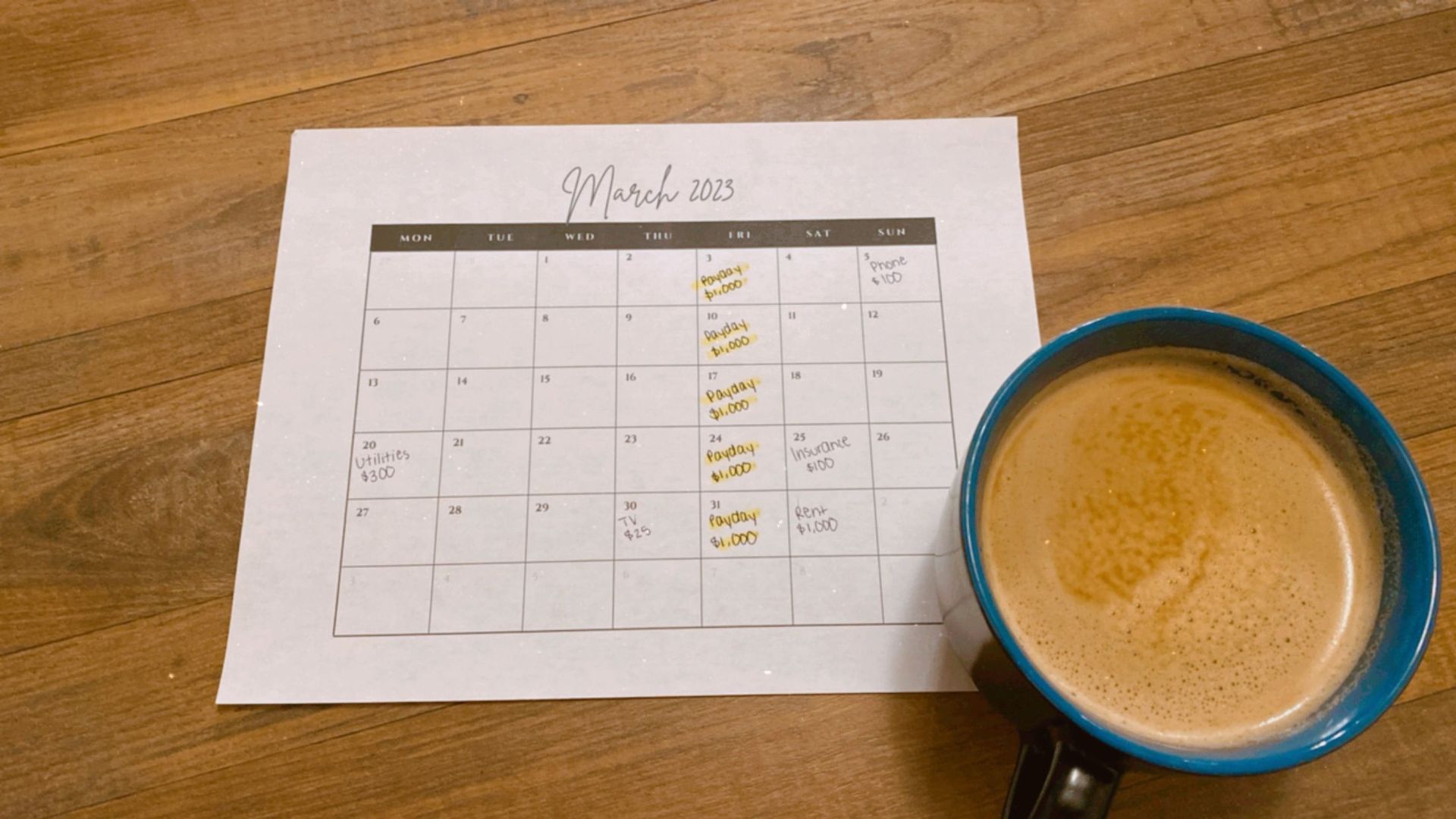
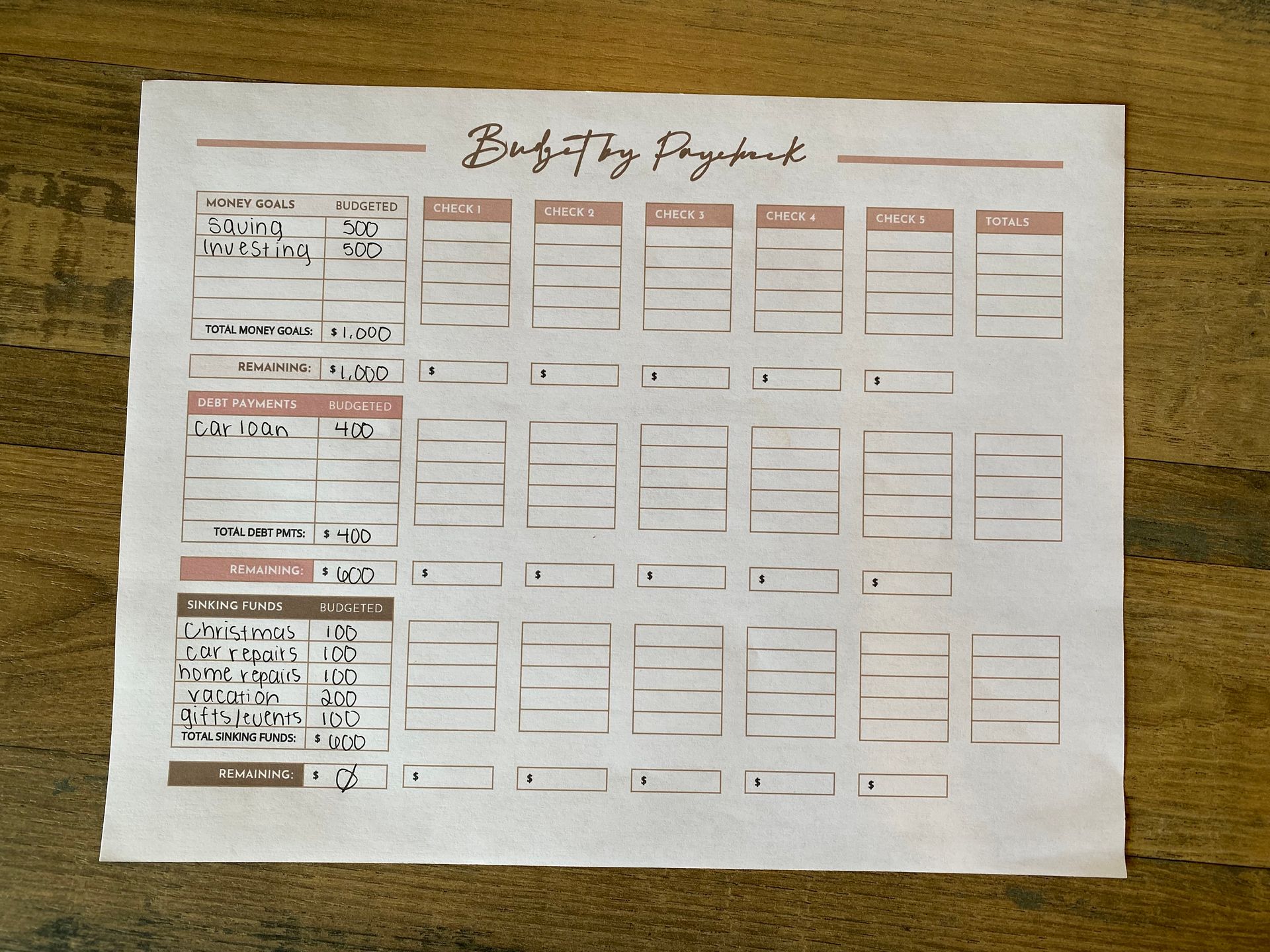
Take your budget a step further and allocate each expense to one or multiple paychecks. The paycheck budget method works great for anyone who is paid more than once a month. It helps take the big picture and break it down into smaller, more manageable chunks. If you're paid more than once a month, your expenses can't all come out of a single paycheck. You have to utilize a bill pay schedule to ensure you aren't spending money before you are paid.
- Step 1: Make a separate column for each paycheck at the top of your budget worksheet. If you are paid bi-weekly, you'll have two columns. If you are paid weekly, you'll have 4-5.
- Step 2: Refer to your calendar with your bills and paychecks on it. For each expense that has as due date, assign it to a paycheck before that date. For larger expenses (such as rent/mortgage), break it up into multiple paychecks to keep even cash flow. For variable expenses (groceries, restaurants, gas/fuel, etc.), it might be helpful to break these down into weekly amounts.
- Step 3: Allocate discretionary/flexible expenses last. Simply plug those into wherever they fit.
- Step 4: Budget every single paycheck down to zero.
- Step 5: Once you are paid, consult your budget for that paycheck. Pay expenses that need to be paid with that paycheck, and earmark the rest of it for other expenses/goals.
- Step 6: Update your budget for every single transaction, so you know exactly how much you have left for each budget category. It might be helpful to do this on a daily or weekly basis.
- Step 7: Keep a reconciliation of your budget balance to your bank account balance. This is especially important if you aren't using a budgeting software that automatically pulls in your transactions. When I was using the free version of the EveryDollar app, I kept a spreadsheet to reconcile my bank balance to my budget balance to ensure I didn't miss transactions.
For a more thorough explanation of this method, read my step by step tutorial of the paycheck budget method.
How my template works, cell by cell
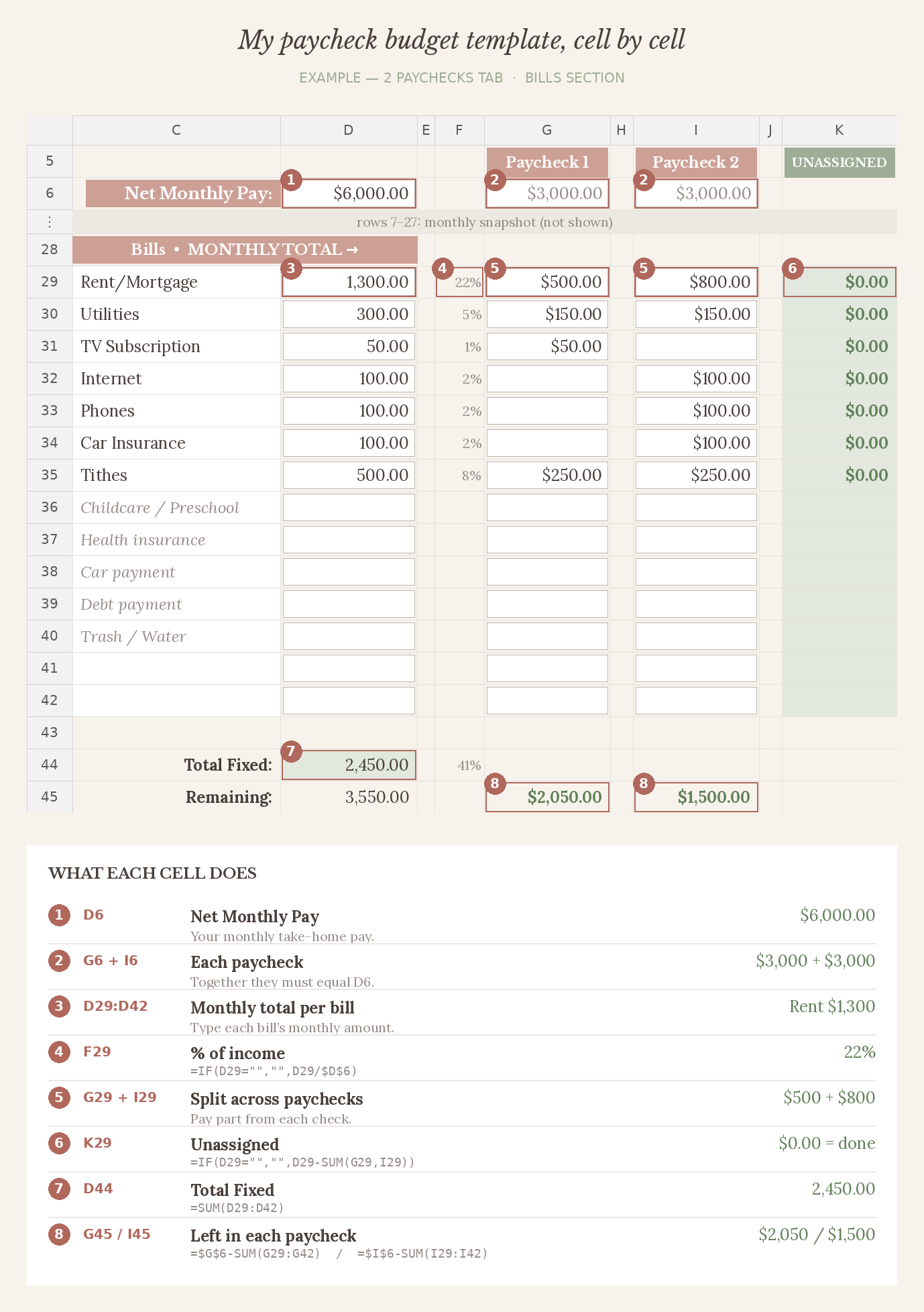
1. Enter your income (row 6)
Type your monthly take-home pay in
D6 ($6,000). Then type each paycheck above its column:
G6 for Paycheck 1 and
I6 for Paycheck 2 ($3,000 each). They should add up to D6. Cell
M6 checks this for you with
=$D$6-SUM(G6+I6)
and shows $0.00 when they match.

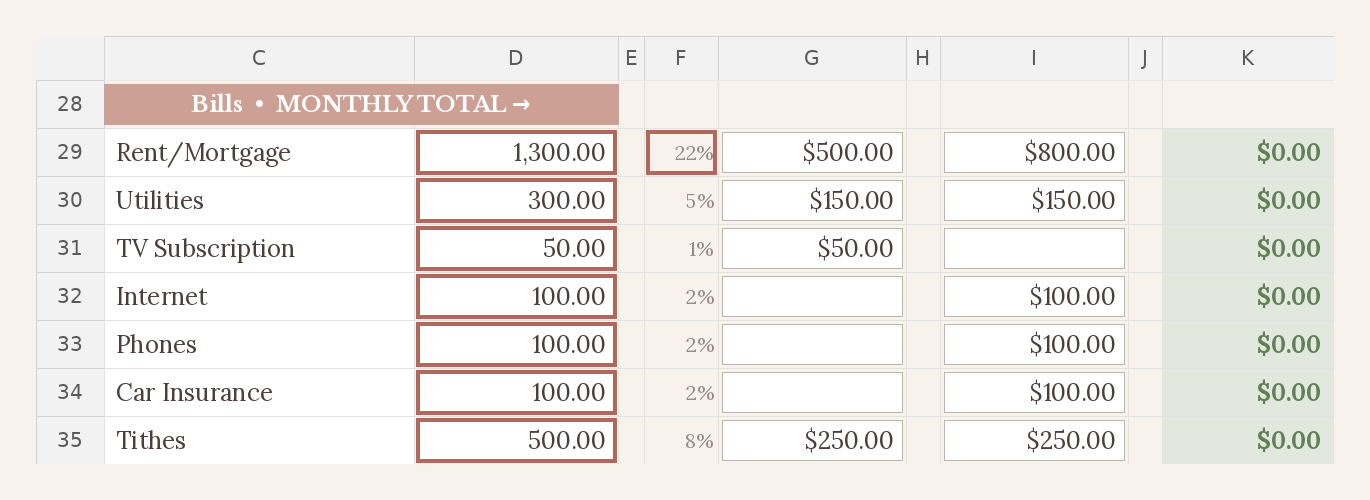
2. Give each bill a monthly total (column D)
Bills go in rows 29–42. Type each one's monthly amount in column
D (Rent/Mortgage is $1,300 in D29). Column
F shows what share of your income it takes:
=IF(D29="","",D29/$D$6)
→ 22%.
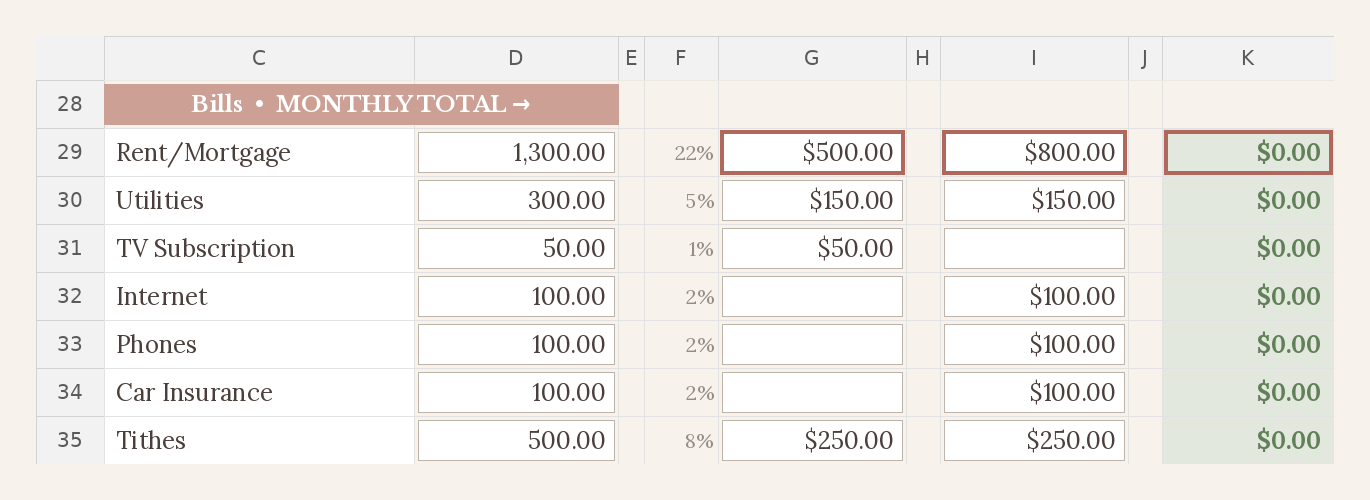
3. Split it across your paychecks (columns G and I)
Decide how much of each bill comes out of each paycheck. Rent/Mortgage is $500 from Paycheck 1 (G29) and $800 from Paycheck 2 (I29). Column
K shows what's still unassigned:
=IF(D29="","",D29-SUM(G29,I29))
. When it says $0.00, that bill is fully covered.
4. Watch each paycheck count down (row 45)
D44 adds up your bills:
=SUM(D29:D42)
→ 2,450.00. Row 45 shows what's left in each paycheck:
G45 is
=$G$6-SUM(G29:G42)
→ $2,050.00, and
I45 is
=$I$6-SUM(I29:I42)
→ $1,500.00. That leftover rolls into your sinking funds, then your flexible spending and savings, until each paycheck reaches $0.

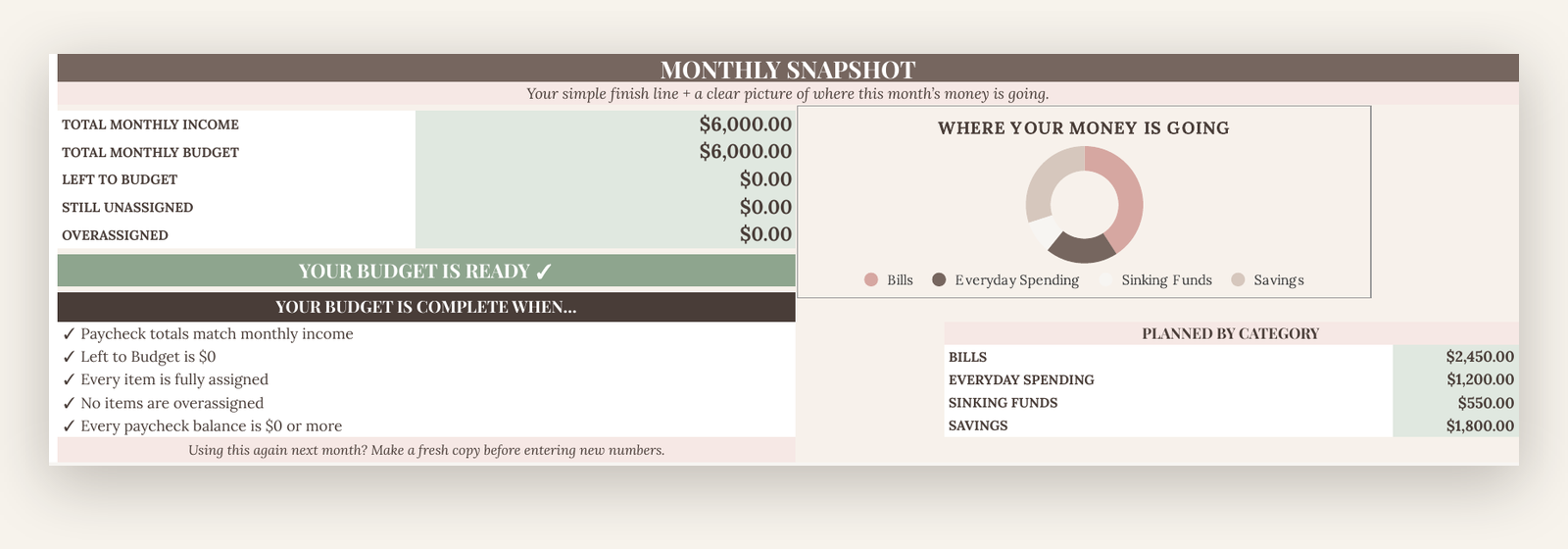
5. Check the Monthly Snapshot
The snapshot at the top does the final check. When your paychecks match your income, no paycheck goes negative, and Left to Budget, Still Unassigned and Overassigned all show $0.00, it says YOUR BUDGET IS READY ✓.
Want it all in one place? Pin this cheat sheet for later.
Prefer to build your own from scratch?
Prefer to build your own? Here's exactly how I'd set it up. It takes about 20 minutes, and these formulas work the same in Excel and Google Sheets.
Here are the three formulas that do most of the work in any budget spreadsheet:
Here are the three formulas that do most of the work in any budget spreadsheet:
- Left to budget:
=Income-SUM(your budget amounts). Aim for $0. - Left in a category:
=Budgeted-Spent - Spending by category, filled in for you: make a tab called Transactions with Date, Category and Amount columns, then use
=SUMIF(Transactions!B:B,"Groceries",Transactions!C:C)
Bonus: select your "left" column, go to
Format → Conditional formatting, and set anything
less than 0 to turn red. You'll spot an overspent category at a glance.
Or skip all of this and grab mine, already built and tested.
Why I split the budget by paycheck
Most budgets assume all your money shows up on the 1st. But if you're paid every other week, the mortgage can be due right before your second paycheck lands. Budgeting each paycheck, the way my template does, means you always know exactly what this paycheck has to cover.
5 mistakes that make people quit budgeting
Many people quit budgeting because they become frustrated that it doesn't seem to be working as they hoped. However, usually all it takes is a few adjustments to get the budget in working order and have success.
Below are the most common budgeting pitfalls I see. Be aware of them so you can assess whether you need to make some changes to the budget!
- Not having a clear picture of expenses. Review bank statements in detail as you're putting your budget together. You want a really clear picture of what it actually takes to run your household every month. Write down every single expense and categorize it. Don't leave any expense unaccounted for!
- Forgetting to budget for non-monthly expenses (both expected and unexpected). If there is one thing that's certain with budgeting, it's that you'll have expenses every single month that are unexpected. So are they really unexpected? For example, you can safely assume that at some point your home and car will need repairs, you just don't know exactly when. Instead of waiting for the expense to hit and bracing for impact, make a budget category for car repairs and put aside money for it every month, carrying the balance over month to month. This way, you don't have to attempt to cash flow the expense in a single month. If it's a really large expense, you'll probably end up using your emergency fund (see next pitfall).
- No emergency fund in place. Like budgeting, a healthy emergency fund of 3-6 months of household expenses is essential. If you have a large, unexpected expense, your emergency fund will turn a financial crisis into an inconvenience. Be sure to get this funded as quickly as possible- put it in the budget!
- Not updating the budget throughout the month. Successful budgeting requires you to be proactive in the budgeting process throughout the month. If you make a budget and don't look at it again until the end of the month, you'll be frustrated! Update your budget at least weekly for actual spending. This way, you know exactly how much you have left for each budget category until the end of the month.
- Being unrealistic. When people first start budgeting, they are often tempted to drastically cut their spending. As a result, they wind up frustrated when they are constantly over budget. If you're spending $800-$1,000 on groceries every month and you try to cut it to $350 in one month, you'll end up frustrated. Don't set yourself up for failure by being unrealistic.
- Spouses not being on the same page. If you're married, its important to be on the same page with your spouse. The budget won't work without them on board. You need to have a shared vision, goals, and mission. You can't budget alone and hope for the best.
- Impulsive spending struggles.
Closing
Whether you're a natural saver or a spender, a budget is how you stop wondering where the money went and start telling it where to go. Start with one month. It won't be perfect, and that's okay. It gets easier every time.

Share this post!

Free printable low-income savings challenges for one-income families. 14 challenges that start with $1 and save $30 to $500, plus a free printable PDF tracker pack.

Learn how we budget on one income as a family of 6 using the paycheck budget method. See our simple system, categories, routine, and free budget template.

Building a house and homeschooling 4 kids? Here is how we afford a semi-organic, real-food diet on one income without burning out. Budget & grocery list included!
Learn how to budget biweekly paychecks on one income with a simple system that helps overwhelmed moms manage two paychecks a month with confidence.
Struggling to make one income stretch? This step-by-step paycheck budget method helps families stop living paycheck to paycheck and finally feel in control.

These budget notebook ideas will inspire your creativity and help you organize and reach your financial goals! Here's what you need in your budget binder to take control of your personal finances.
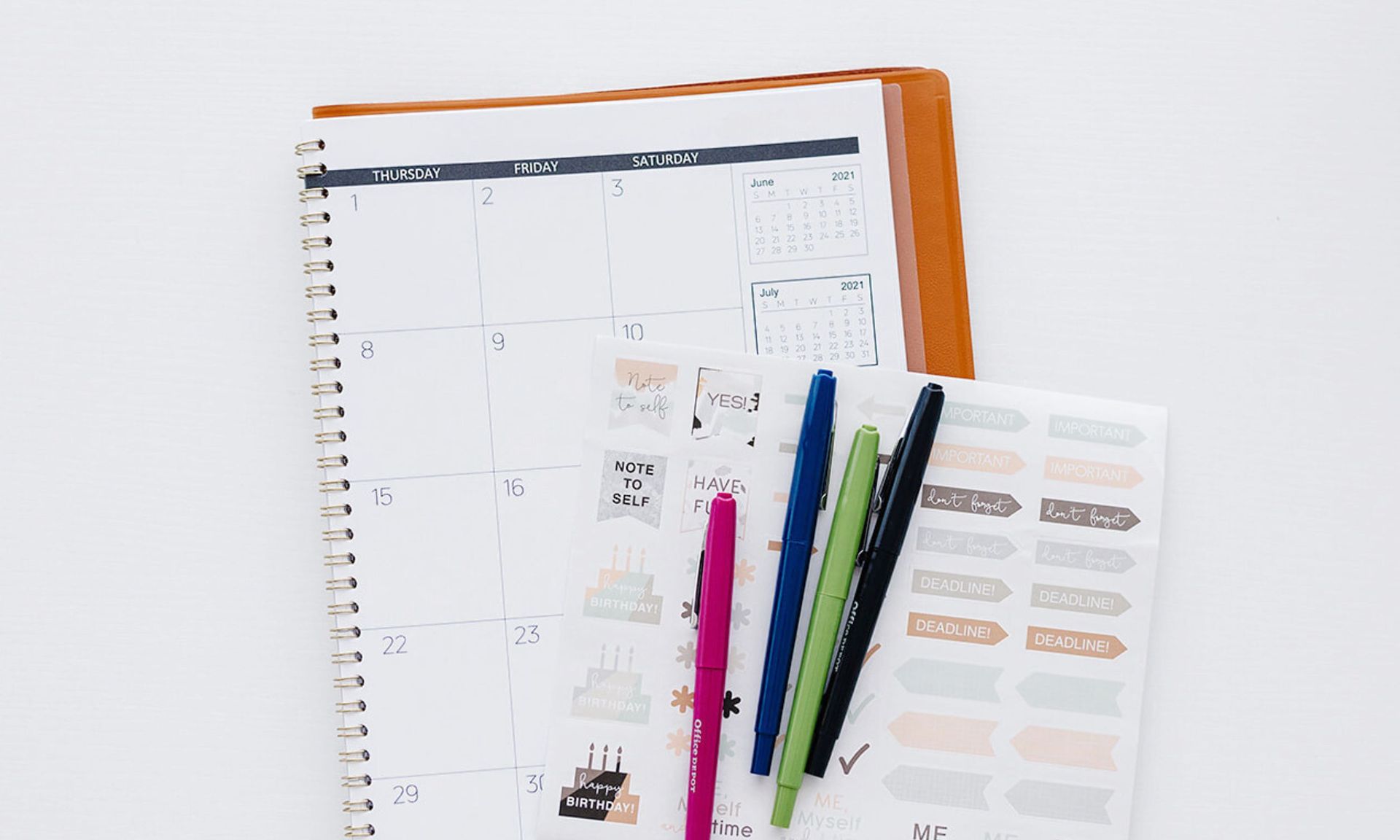
Organize your personal finances by utilizing a budget calendar- lay out your paychecks, bills, social events, etc., so you know exactly what you need to budget for in the month ahead!

Whether you have credit card debt, student loans, a car loan, or mortgage debt, use these debt free coloring pages as your debt payoff tracker; keeping you focused and motivated to become debt free!
