




budget by paycheck
WHEN IT COMES TO BUDGETING, IT SHOULD BE SIMPLE
When I began budgeting, I found myself overwhelmed with all of the details that came with tracking my budget monthly. It seemed like a big task and I needed it broken down into smaller steps. My husband and I turn to the Budget by Paycheck forms and paid off $20k of student loan debt in 12 months. All while living on ONE income.
The budget by paycheck method allows you to look at your budget in terms of the big-picture and break it down into paychecks. This will help you know exactly what expenses are being budgeted with each paycheck. When it comes to budgeting, the budget by paycheck method keeps it simple and easy.
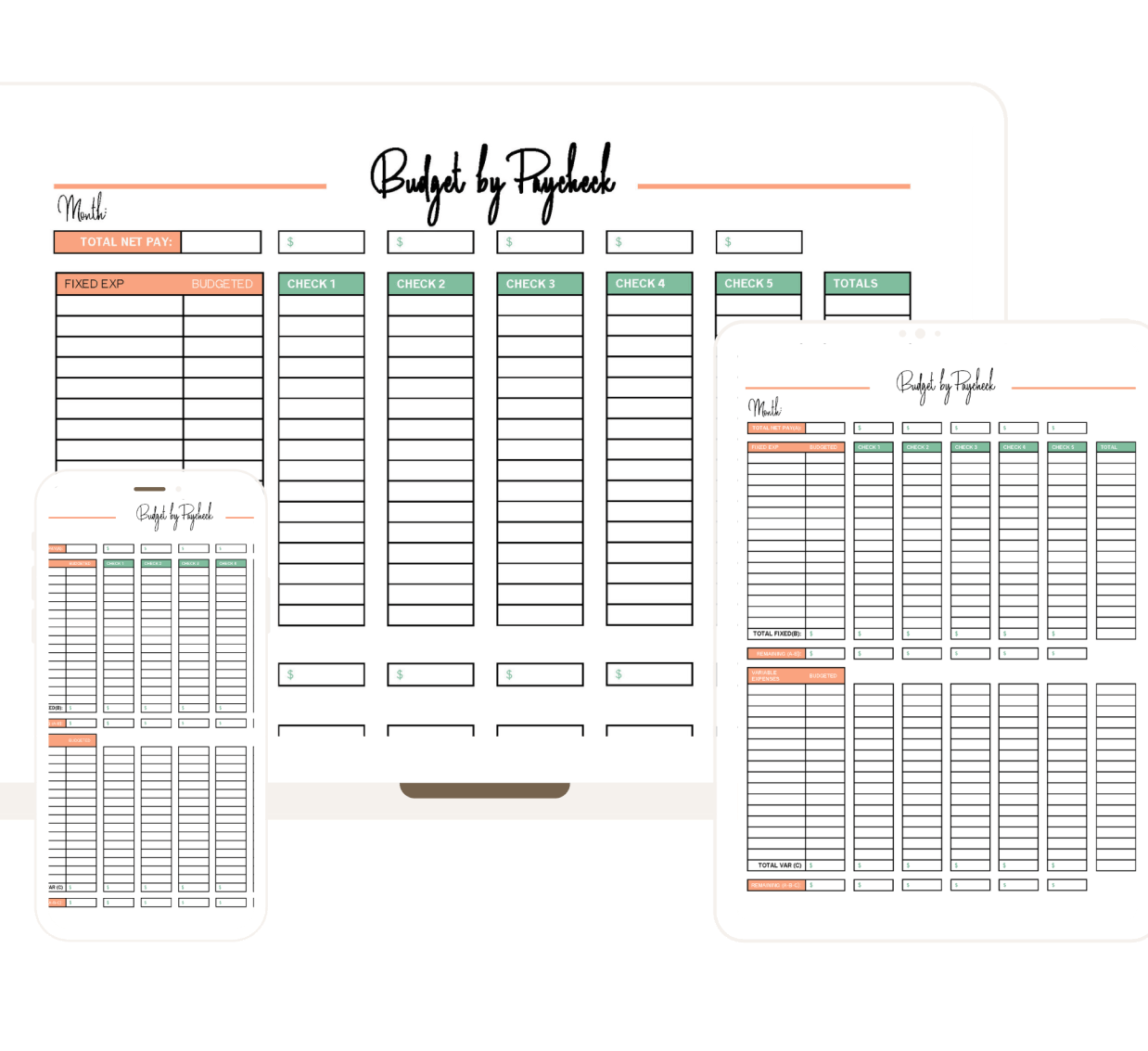

Budgeting Taught the Right Way

Create a simple, effective budget plan
Have confidence in your finances
Destroy debt & live debt-free
Invest for your future & stress less about retirement
Live below your means

I love this spreadsheet! It’s easy to customize and make your own. Mel was also very quick to answer my questions!
BRITTNEY MCGUIRE - AUG 21, 2020

These templates are just perfect! Melanie answered my question real quick, and i cannot wait to begin using these forms!
CARMEN VIERHUIS - FEB 1, 2021

Very excited to get money in order this year and budget !! Super cute and very easy to use!! This helps so much with important budgeting bills and even day-to-day wants and needs. 10/10 recommend
JENNA - JAN 6, 2022

I wasn't sure what budget layout would work for me until I came across this one! Thank you!
ELIZABETH RODRIGUEZ - AUG 12, 2021
what we offer
Become debt-free, save, and invest in your future!
01. The Ultimate Budget Bundle

Printable Budget Planner

Budget Printables

PDF Printable Finance Planner

Instant Download
02. The Ultimate Wedding Budget Bundle
Excel Customizable Wedding Budget Tracker
Wedding Budget Expense Tracker
Wedding Budget Fillable Template
Wedding Budget Fillable Planner
03. Paying Off Debt, Planning, & Organization
Debt Snowball Editable PDF Template
Weekly Plan Printable Fillable Templates
Vertical Cash Envelopes
Horizontal Cash Envelopes
meet your guide
Melanie De Jong
Hey There, I’m Melanie! I am a former CPA turned personal finance blogger and mom of three. When you ‘Budget With Mel,’ you’ll develop monthly budgets, cost-cutting tactics, and learn new behaviors and beliefs about money. It’s time you took the stress and confusion out of your personal finances.

unlimited value
When You Budget With Mel
Are you struggling to find the right budget system for your finances? When you Budget with Mel, it pays to have a plan in the long run. It’s time to cut the confusion and stress out of your personal finances.
Product 1: Excel Customizable Paycheck Budget
$3.99
Product 2: Paycheck Budget PDF Spreadsheets
$2.99
Product 3: Excel Customizable Budget Template
$5.30
Product 4: Budget Template
$2.99
Product 5: Expense & Bill Tracker
$3.50
TOTAL VALUE:
$19.00

Frequently Asked Questions

BUDGET WITH MEL — PAYCHECK BUDGET STARTER KIT LANDING PAGE
Paste this entire file into a full-width Custom HTML / Code block.
Before publishing, search this file for "REPLACE:". Those comments mark the
real spreadsheet images, your photo, the demo video, and ThriveCart checkout.
All styles are scoped to .bwm-page so they do not restyle the rest of your site.
================= HERO =================
REPLACE: swap this placeholder for your paid-template Example Month desktop mockup.
================= PAIN =================
================= FOUR FINISH LINES =================
================= SEE IT =================
================= SETUP =================
================= WHAT'S INSIDE =================
================= FREE vs KIT =================
================= STORY =================
================= REASSURE =================
================= FAQ =================
================= CHECKOUT =================
REPLACE: paste the complete ThriveCart embedded-checkout code inside this column.
The Paycheck Budget Starter Kit
Which paycheck pays which bill?
A simple paycheck-by-paycheck system for busy moms who want bills, groceries, savings, and everyday spending spoken for before the money disappears.
1–6 paychecks
12 monthly budgets
Dashboard + 3 trackers
Google Sheets + Excel
Get the Starter Kit →
$9
launch price · {{$19}}
after {{END DATE}}
· instant access
Hero image
The dashboard tab, cropped tight — real numbers, nothing empty, no ###
columns. Reuse the framing from your Flodesk GIF: clean floating window on cream, no browser chrome. 1600×1200.
Why paycheck budgeting works
A monthly budget tells you what. A paycheck budget tells you when.
Tells every paycheck exactly where to go
before the money gets spent.
Matches the plan to real life
by budgeting around when you're actually paid.
Prevents the mid-month squeeze
because you know which paycheck covers each expense.
Makes one income feel more manageable
by breaking one big monthly plan into smaller decisions.
Helps you save consistently
even when there isn't a lot left over.
Gives you permission to spend
because you can see what's already covered.
"Your monthly budget tells you what the money needs to do. Your paycheck budget tells you when
it can actually do it."
The method
Four finish lines tell you when the month is planned.
No guessing whether you're done. The template checks four things for you, and when they all read zero, your plan is ready.
Left to budget
$0
Income equals the monthly plan.
Not yet assigned
$0
Every planned dollar has a payday.
Overassigned
$0
No category is assigned too much.
Each paycheck left
$0+
Assignments never exceed take-home pay.
When all four are healthy, you're done. Close the laptop.
See it in action
From paycheck deposited → every dollar assigned.
Enter your real numbers, split a category across paydays when that makes more sense, and keep going until the finish lines hit zero.
REPLACE: insert your YouTube/Vimeo responsive iframe here, or replace this whole .slot.Demo GIF or short video
Net pay typed in → categories fill → Left to assign drops to $0. You already have this asset from the Flodesk opt-in (1000×667, ~147 KB, 5-second loop). Reuse it — don't leave an empty player here.
How it works
Set up your first month in about five minutes.
Follow this order once. After that, the template does the checking for you.
1
Choose the month
Open any month, January through December, and pick how many paychecks you'll receive.
2
Enter take-home pay
Add each payday and the actual amount that hits your account — not your gross salary.
3
Build the whole-month plan
Every bill, everyday expense, sinking fund, savings goal, and debt payment, at its full monthly amount.
4
Assign it to paychecks
Place each planned dollar under the paycheck that will fund it. Split a category across paydays when needed.
5
Check the finish lines
The four checks show what's still unbudgeted, unassigned, or overassigned — so you know exactly what needs attention.
✓
That's the whole system
No formulas to write, no setup video required. The Start Here tab walks you through it the first time.
White cells — you type here
Colored cells — calculate automatically
Everything included
A complete paycheck-budget system — without the clutter.
Enough structure to make the decisions easier. Not so much that the spreadsheet becomes another chore.
REPLACE: real paid-template paycheck assignment screenshot.
Screenshot
Paycheck assignment columns Crop tight. 800×500.
1–6 paycheck planning
Twelve ready-to-use monthly budgets with clear paycheck assignments and the four finish-line checks built in.
REPLACE: real paid-template dashboard screenshot.
Screenshot
The monthly dashboard Crop tight. 800×500.
Smart monthly dashboard
A calm overview: income, planned spending, goals, category breakdowns, and paycheck status at a glance.
REPLACE: real paid-template trackers screenshot.
Screenshot
Sinking funds + net worth Crop tight. 800×500.
Future-focused trackers
Sinking funds, savings goals, and a full-year net worth tracker — with formulas and on-brand charts already set up.
Start Here & Download Guide
— a 3-page PDF with your five-minute setup, the finish-line explainer, and troubleshooting.
Category prompts already filled in
— childcare, copays, sports registration, back-to-school, and dozens more, so you're not staring at blank rows.
Formula cells locked
— you can't accidentally delete the math, and unlocking is one click if you want to customize.
Print-ready
— every tab set up to print on one page if you like planning on paper.
Delivered as a Google Sheets copy and a downloadable Excel file. Use whichever you prefer.
Already downloaded the free template?
Here's exactly what the Starter Kit adds.
Free Paycheck Template
A single month, to see if the method fits
- – One month
- – Paycheck assignment
- – Sinking funds and savings basics
- – Google Sheets and Excel
The Starter Kit
Paycheck Budget Starter Kit
The whole year, planned
- All 12 months, ready to use
- 1–6 paychecks per month
- Smart monthly dashboard
- Full sinking funds + savings goal trackers
- Full-year net worth tracker
- Start Here & Download Guide (PDF)
REPLACE: use a real, unedited photo of Mel at the kitchen table or with the laptop.
Photo of Mel
A real photo — at the kitchen table, laptop open. This is the single strongest trust element on the page. Don't skip it. 800×1000.
Budget With Mel
The spreadsheet I wanted when the budget had to work around the paychecks.
I'm a former CPA, but this isn't a complicated accountant's spreadsheet. I'm also a homeschooling mom of four living on one income, and I built it around the way I actually manage our family's money: start with the whole month, then decide exactly which paycheck covers each bill, grocery trip, savings goal, and category.
We used this kind of careful, paycheck-by-paycheck planning to pay off more than $20,000 of debt in 12 months. Today, it's still the system I open every month because it gives me a plan without asking me to hold every number in my head.
— Mel
Before you buy
Three things worth knowing.
Your numbers stay yours
You make your own copy in your own Google Drive. I never see your income, your bills, or your balances — there's no account, no sync, no dashboard on my end.
You don't need to be a spreadsheet person
White cells show you where to type. Everything colored calculates itself. If you can fill in a form, you can use this.
Stuck? Email me
Reply to your receipt or write to melanie@budgetwithmel.com and I'll help you get set up. A real person, same day where I can.
Questions before you buy?
Probably the same ones I would ask.
Do I need to be good with spreadsheets?
No. White cells show you where to type, calculated cells are colored so you know not to touch them, and the Start Here tab walks you through setup the first time. The formula cells are locked, so you can't accidentally break the math.
What if we get more than two paychecks a month?
The system handles one through six paychecks. You pick the number at the top of each month, and the extra paycheck columns are excluded from every calculation when you don't need them.
How is this different from the free template?
The free template is one month, so you can try the method. The Starter Kit is the full year: 12 monthly budgets, up to six paychecks each, the monthly dashboard, full sinking funds and savings goal trackers, a full-year net worth tracker, and the Start Here guide.
Do I get Google Sheets or Excel?
Both. Google Sheets is the recommended version — it's the full experience, works on any device, and the paycheck columns respond automatically. The Excel file is included for anyone who prefers a local file; the formulas and layout carry over, but a little of the Google-specific automation doesn't. If you're deciding, start with Sheets.
Can I customize the categories?
Yes. There are "add your own" rows throughout, already seeded with common family categories so you're not starting from blank. The guide explains how to add more rows if you truly need them.
Is this only for one-income families?
No. It was designed with one-income family life in mind, but you can enter any number of income sources or paychecks that fit your household.
How do I get it after I pay?
Instantly, by email. You'll get the Start Here guide with one button to copy the Google Sheet into your own Drive and one to download the Excel file. Takes about a minute. Use a computer rather than your phone for the initial setup.
What's the license?
A personal household license. Make as many copies as you like for your own use. Please don't share the download links or files, resell or redistribute the template, post it publicly, or use it as a deliverable for paid client work.
Ready when you are
Make the next paycheck easier to plan.
Instant access to the complete Paycheck Budget Starter Kit — at the launch price through {{END DATE}}.
Kit
cover
cover
The Paycheck Budget Starter Kit
Digital spreadsheet system + PDF guide
12 monthly budgets, 1–6 paychecks each
Smart monthly dashboard
Sinking funds, savings goals, net worth
Start Here & Download Guide (PDF)
Google Sheets + Excel
Total today
$9
{{$19}}
Secure checkout · Instant digital delivery · Personal household license
$9
launch price through {{END DATE}}
Get the kit →